
Are you looking for a powerful, customizable WordPress theme or plugin for your website? Look no further than ThemeForest! In this blog, we will give you an in-depth review of the popular marketplace, which offers a wide array of premium themes and plugins from top developers worldwide.
We will also highlight the benefits of using ThemeForest WordPress themes and provide a list of popular options to choose from.
Additionally, we will guide you through the steps of choosing the right theme, installing it on your WordPress site, and customizing it to fit your needs.
We will also discuss pricing and licensing options and provide alternatives to ThemeForest for those seeking other options.
So whether you are a seasoned developer or just starting out with your first website, this blog is perfect for anyone interested in creating a stunning online presence with ease.
Informational: we update this post monthly so be sure to follow and see what themes and plugins are taking the lead.
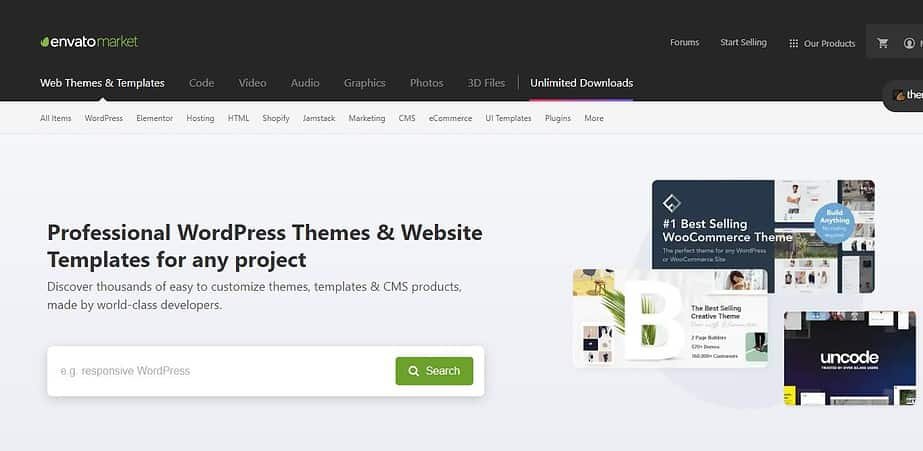
What is ThemeForest?
With over 45,000 items available for purchase and regular updates, ThemeForest is a popular online marketplace for WordPress website owners looking for quality themes and plugins. Whether you're running a simple blog or an e-commerce site, the platform offers a wide range of options to suit your needs.
With categories such as business, creative, and portfolio, you'll be able to find the right theme or plugin to make your website stand out.
Plus, with customer support and documentation available, you can rest assured that your website will stay up-to-date and functional.
Benefits of using ThemeForest WordPress themes
Using ThemeForest WordPress themes offers numerous benefits for website owners.
Firstly, it provides a vast selection of high-quality themes and plugins that enhance website functionality and design.
Secondly, it saves time and money compared to designing a custom website from scratch.
Additionally, the themes are customizable, allowing users to personalize their site according to their brand or business needs.
Many of the themes come with built-in SEO optimization, mobile responsiveness, and e-commerce integration features.
The large community of developers on ThemeForest also provides support and updates for their products. Overall, using ThemeForest WordPress themes is an excellent choice for your website needs.
Popular WordPress Themes on ThemeForest
When it comes to WordPress themes, ThemeForest offers an extensive range of options to choose from. With over 45,000 items available, it can be overwhelming to select the right theme for your website.
However, user reviews and ratings can help guide your decision-making process.
The most popular themes on ThemeForest include Avada, X Theme, and Enfold. These themes offer a plethora of customization options and additional features such as built-in SEO optimization, mobile responsiveness, and e-commerce integration.
Consider the purpose of your website, design and layout options, and compatibility with plugins and browsers before making a final choice.
BeTheme
BeTheme is a versatile WordPress theme that provides over 600 pre-built websites and customization options for various website types, including business, portfolio, and e-commerce sites.
With a drag-and-drop page builder, responsive design, and compatibility with popular plugins like WooCommerce and Contact Form 7, BeTheme caters to all your needs.
It offers excellent customer support and regular updates to ensure compatibility with the latest version of WordPress.
Enfold
Enfold is an all-in-one WordPress theme that offers a range of features and functionality to meet your website needs.
Its drag-and-drop page builder makes it easy to customize the layout and design of your site, while pre-built demos and templates can help you get started quickly.
With optimized speed and SEO, Enfold ensures your site performs well in search engines and for your users.
Plus, its excellent customer support forum and documentation are available to assist you every step of the way. Overall, Enfold is a reliable option for any type of website.
Bridge
When it comes to versatility, Bridge is an excellent choice for those looking for a multipurpose WordPress theme.
With over 500 pre-built demos and advanced design options, such as parallax scrolling and video backgrounds, you can create a unique website that stands out.
Additionally, Bridge is compatible with popular plugins like WooCommerce and WPBakery Page Builder, making it easy to add functionality to your site.
Its responsive design ensures that your website looks great on any device, while its regular updates guarantee compatibility with the latest version of WordPress.
Jupiter
Jupiter is a versatile and multipurpose WordPress theme that comes with over 500 pre-designed website templates.
Its drag-and-drop page builder makes it easy for users to customize their websites, while its SEO optimization ensures that your website looks great on all devices.
Jupiter also includes premium plugins such as the Visual Composer and Layer Slider, and users can access excellent customer support through the theme's dedicated team.
With its multiple design options and user-friendly interface, Jupiter is an excellent choice for anyone looking to create a professional-looking website.
Popular WordPress Plugins on ThemeForest
Plugins can enhance the functionality of your WordPress site, and ThemeForest offers a wide variety of options to choose from. Among the popular choices are Yoast SEO, WPForms, Jetpack, Elementor, and WooCommerce.
Yoast SEO is an excellent option for optimizing your content for search engines, while WPForms makes it easy to create custom forms with its drag-and-drop interface.
Jetpack offers website optimization tools and analytics, and Elementor allows users to design custom pages without any coding skills. Finally, WooCommerce is a powerful plugin that enables online businesses to sell products and services through their WordPress site.
WPBakery Page Builder
WPBakery Page Builder is a popular drag-and-drop page builder plugin that simplifies the process of creating custom page layouts for WordPress users.
It eliminates the need for coding knowledge by providing pre-designed templates and elements that can be easily customized according to one's needs.
WPBakery Page Builder works seamlessly with most WordPress themes and plugins, including popular ones like Yoast SEO and WooCommerce.
Its user-friendly interface has earned it high ratings and positive feedback from satisfied customers on ThemeForest.
Revolution Slider
Revolution Slider is an excellent WordPress plugin that can help you create attractive and responsive sliders for your website.
Whether you're a beginner or an experienced designer, this plugin is easy to use thanks to its intuitive drag-and-drop editor and variety of pre-built templates.
With advanced features such as multi-layer slides, video backgrounds, and animation effects, Revolution Slider can take your website to the next level.
Plus, it's compatible with all major browsers and mobile devices, making sure your site looks great no matter where people are viewing it from.
Overall, Revolution Slider is a reliable choice if you're looking to add some visual appeal to your WordPress site.
Contact Form 7
Creating a contact form is an essential part of any website, and Contact Form 7 makes it easy to create and manage multiple forms.
The plugin's range of customization options allows you to tailor your forms to your specific needs, including adding fields, and setting up email notifications and confirmation messages.
With its support for CAPTCHA and Akismet spam filtering, Contact Form 7 ensures that your forms are secure while providing a user-friendly experience for your visitors.
Plus, its compatibility with most WordPress themes and ability to be translated into several languages make it a reliable choice for website owners worldwide.
Slider Revolution Responsive WordPress Plugin
Slider Revolution is a dynamic WordPress plugin that can add flair to your website with its stunning and responsive sliders. With an extensive library of templates, animations, and effects to choose from, the plugin provides endless possibilities for customization.
The drag-and-drop editor makes it easy for users of any skill level to create professional-looking content, while multi-layer slides, video backgrounds, and animation effects offer advanced features for those seeking more creativity.
Rated at 4.5 stars on ThemeForest with over 6,000 sales, Slider Revolution is a reliable choice for anyone looking to enhance the visual appeal of their WordPress site.
Yoast SEO
Improving your website's SEO can be a daunting task, but with Yoast SEO, it becomes seamless. This powerful plugin provides a range of features that ensure your site is optimized for search engines.
From keyword optimization to readability analysis, Yoast SEO has got you covered.
Additionally, the plugin generates an XML sitemap that helps search engines understand the structure of your site better.
By improving your website's visibility and driving more traffic to it, Yoast SEO is an essential tool for any WordPress user looking to enhance their site's performance.
Essential Grid Gallery WordPress Plugin
Essential Grid Gallery is a versatile WordPress plugin that allows you to create visually stunning galleries and display them in various styles.
With pre-designed templates for portfolio, blog, and e-commerce sites, the plugin is user-friendly, offering drag-and-drop functionality that makes customization a breeze.
Moreover, it provides responsive design options that ensure your galleries look great on all devices. Overall, Essential Grid Gallery provides a robust solution for adding engaging visual content to your WordPress site.
How to Choose the Right Theme on ThemeForest
When it comes to choosing the right theme on ThemeForest, there are several factors that you should consider.
One of the most important things to think about is the purpose of your website. Are you creating a blog, a portfolio website, or an e-commerce site? Each type of site has different requirements and needs a theme that can cater to those specific requirements.
You should also look for themes with good ratings and reviews from other users, as well as those that are regularly updated and supported by the developer.
By taking the time to evaluate these different factors, you can select a theme that fits your needs and enhances your website's functionality.
Purpose of your website
When choosing a theme on ThemeForest, the purpose of your website should be the first consideration.
Whether it's a blog, e-commerce site, or portfolio, your theme should reflect and enhance your content or products.
A well-designed theme can not only improve the experience for visitors but can also help you achieve your goals more effectively.
Consider features like layout options, customization capabilities, and compatibility with plugins and browsers to ensure that your chosen theme meets your needs.
Design and layout options
When it comes to choosing a WordPress theme from ThemeForest, design and layout options are crucial factors to consider.
With a vast array of themes available, it's important to find one that aligns with the overall look and feel you want for your website.
Look for themes that offer customizable options like color schemes and font choices. Additionally, ensure that the theme is responsive and can adapt to various screen sizes, making sure your website looks great on all devices.
Features and Functionality
When choosing a theme on ThemeForest, it's essential to consider the specific features and functionality your website requires.
Customizable layouts, responsive design, and compatibility with popular plugins are important factors to keep in mind. Additionally, it's crucial to look for themes that align with your branding and design preferences.
Don't forget to check reviews from other users and the level of support offered by the developer before making a purchase decision.
Compatibility with plugins and browsers
Ensuring compatibility with third-party plugins and different web browsers is crucial when selecting a WordPress theme from ThemeForest.
Some plugins may require specific theme features or configurations, which can limit your options. Similarly, some themes may not display correctly on certain browsers, which can lead to user frustration and decreased engagement.
Before making a purchase decision, carefully review the theme's documentation and check for any reported issues with your desired plugins and browsers to ensure seamless integration.
Ratings and reviews
The ratings and reviews of themes or plugins on ThemeForest are valuable indicators of their overall quality.
Highly rated products with positive reviews from a large number of users are often a good choice, but it's also important to pay attention to the comments section for any limitations or issues reported by users.
When considering ratings and reviews, don't forget to take into account the specific needs of your website and make sure the product aligns with your overall design preferences and functionality requirements. Additionally, be sure to check for customer support options and regular updates before making your final decision.
Support and documentation
When it comes to choosing a theme on ThemeForest, support, and documentation are essential factors to consider.
Quality documentation that includes installation instructions, customization options, and troubleshooting tips can save you time and frustration in the long run.
Responsive customer support is also crucial in case any issues arise. Look for themes with good support and documentation, and consider purchasing those with extended support options for added peace of mind.
By prioritizing these factors, you can ensure a smooth experience using your chosen WordPress theme from ThemeForest.
How to Install a Theme from ThemeForest
Installing a theme from ThemeForest is a simple process that can be completed in just a few steps.
First, you need to purchase the theme and download the theme files. Once you have the files, log in to your WordPress site and navigate to the Appearance > Themes section. From there, click on the "Add New" button and then select "Upload Theme." Choose the theme file that you downloaded from ThemeForest and click "Install Now." After that, activate the theme and customize it as per your needs.
Make sure to also install any required plugins that come with the theme for optimal functionality.
Downloading the theme files
Before uploading a theme from ThemeForest, it is crucial to download the appropriate files.
Once you have purchased the theme, head to your account and download the .zip archive file which contains all necessary files for installation.
However, remember not to unzip the downloaded file and directly upload it to your WordPress site via the "Appearance" tab in the dashboard.
Ensure that you activate the installed theme after completing the installation process.
Uploading and activating the theme
Once you have downloaded the theme files from ThemeForest, it's time to upload and activate the theme on your WordPress site.
The process is quick and straightforward, and can be completed within a few clicks in just a matter of minutes.
Once activated, make sure to also install any required plugins or follow any specific instructions provided by the theme developer to ensure optimal performance and functionality.
Installing and activating required plugins
To ensure optimal functioning of your ThemeForest theme, it's important to carefully follow the instructions provided by the developer regarding required plugins.
These plugins are often necessary for the theme to work as intended and may include tools for creating custom layouts or adding new functionality.
Before installing any plugins, ensure that they are compatible with your version of WordPress and that you have downloaded the correct versions specified by the theme developer.
Double-checking these details can save time and prevent potential issues down the line.
How to Customize a Theme from ThemeForest
Customizing a ThemeForest theme can seem intimidating, but there are many options available to make the process easier.
First, choose a theme that aligns with your brand and website goals. Then, use the built-in customization options to make simple changes like colors and fonts.
For more advanced customizations, page builders like WPBakery or Elementor can help. Learning basic HTML/CSS coding is also an option.
Consider purchasing additional plugins or add-ons for added functionality and test your customized theme thoroughly before publishing to ensure it performs well on all devices and browsers.
Customization options in WordPress Customizer
The WordPress customizer is a powerful tool for customizing ThemeForest themes to your liking.
It provides a user-friendly interface that allows you to make changes such as colors, fonts, and layouts without the need for coding knowledge.
In addition to these basic settings, many ThemeForest themes come with built-in customization options tailored specifically for that theme.
Be sure to explore all available customization options before making any changes and test thoroughly before publishing.
Using page builders for more advanced customization
When it comes to taking your website customization to the next level, utilizing a page builder can be a game-changer.
These powerful tools offer a drag-and-drop interface that makes it easy for even non-technical users to customize their ThemeForest theme.
Popular options like Elementor, Divi, and Beaver Builder allow you to add new sections, create custom layouts, and tweak the styling of existing elements.
With page builders at your disposal, you can bring your creative vision to life without needing to know how to code.
Editing theme files directly
Customizing your ThemeForest theme by editing the theme files directly can be a risky process that requires a good understanding of coding.
To ensure the security and stability of your website, it is important to create a child theme before making any changes to the original theme files.
This way, you can make modifications without affecting the functionality of the parent theme.
Use a code editor to make changes to the child theme and always test the website after making those changes to confirm there are no issues or errors.
ThemeForest Pricing and Licensing Options
When it comes to pricing and licensing options, ThemeForest offers a wide range of choices for WordPress theme and plugin purchases.
Whether you prefer a one-time fee or subscription-based payment, there are options available to suit your needs. Additionally, ThemeForest offers bundle deals and discounts for multiple purchases.
However, some themes may come with additional costs, such as premium support or updates. It's important to review the licensing options and pricing ranges for each theme or plugin before making a purchase decision.
Regular License vs Extended License
When purchasing themes or plugins on ThemeForest, it's important to consider which license best suits your needs.
The Regular License allows for use in a single end product, while the Extended License permits use in multiple end products or for resale.
Although the Extended License is more expensive, it provides greater flexibility for those who require it.
Before making a purchase, be sure to read and understand the terms of each license to ensure that you select the appropriate option for your needs.
One-time fee vs Subscription-based payment
When it comes to purchasing themes and plugins on ThemeForest, you have the option of either a one-time fee or a subscription-based payment.
A one-time fee gives you lifetime access to the product and its updates, while a subscription-based payment provides access for a set period.
While subscription-based payments may be more cost-effective in the short term, it's important to consider your long-term needs and budget before making a decision.
Pricing ranges for WordPress themes and plugins
The pricing ranges for WordPress themes and plugins on ThemeForest vary greatly depending on the features and functionality of the product. While some themes are available for free, others can cost over $100, with most premium themes falling in the $50-$80 range.
Plugins also vary in price, with some being free and others costing up to $50 or more.
It's essential to consider licensing options when purchasing a theme or plugin as there may be restrictions on how it can be used.
Additionally, ThemeForest offers discounted rates for purchasing bundles of themes or plugins.
Top ThemeForest Alternatives for WordPress Themes and Plugins
When it comes to finding alternatives to ThemeForest for WordPress themes and plugins, there are several options worth considering.
Envato Elements is a subscription-based service that provides access to a wide range of digital assets, including themes and plugins.
TemplateMonster offers a vast selection of WordPress themes and plugins at affordable prices, while Elegant Themes offers an all-in-one solution with their popular Divi theme and plugin.
StudioPress is known for its Genesis framework, offering high-quality themes and plugins for WordPress users.
MyThemeShop also has a diverse collection of premium WordPress themes and plugins with regularly updated designs.
Consider your budget, design needs, and licensing preferences when choosing an alternative to ThemeForest.
Elegant Themes
Elegant Theme is a top alternative to ThemeForest for WordPress themes and plugins.
Their flagship product, Divi, is a popular theme that enables users to create custom designs without any coding experience. The theme's drag-and-drop interface makes it easy to build pages and websites quickly, with real-time editing options.
In addition to Divi, Elegant Themes offers a suite of other plugins, including Monarch for social media sharing and Bloom for email opt-ins.
Their pricing structure is straightforward and affordable, with an annual fee giving access to all their products. Furthermore, users can benefit from their extensive documentation and community support.
StudioPress
When it comes to premium WordPress themes and plugins, StudioPress is a top contender.
Their themes are built on the powerful Genesis framework, which provides security and performance benefits for your website.
In addition to their high-quality themes, they offer a range of plugins that can enhance your site's functionality, from SEO to e-commerce.
With excellent customer support through their extensive knowledge base, forums, and ticket system, StudioPress is a reliable choice for WordPress users looking to elevate their website's design and performance.
Themify
Looking for a user-friendly and affordable alternative to ThemeForest for your WordPress site? Consider Themify, a popular platform that offers a range of customizable themes and plugins.
Their drag-and-drop builder makes it easy to create unique designs without any coding knowledge, while add-ons like social media integration and eCommerce capabilities can enhance the functionality of your website.
With responsive customer support and helpful resources, Themify is an excellent choice for those seeking flexibility and ease of use.
MyThemeShop
MyThemeShop offers a range of customizable themes and plugins for WordPress users, both free and premium. Their themes are optimized for speed, user experience, and SEO.
The variety of customization options available, including color schemes and layout settings, allows users to create unique designs without any coding knowledge.
Additionally, their excellent customer support through forums and ticket systems makes them an affordable option for beginners or those on a budget.
Summary of benefits of using ThemeForest WordPress themes
Using ThemeForest WordPress themes offers numerous benefits for your website.
These high-quality themes are optimized for search engines, ensuring that your website ranks well and is easy to find.
Additionally, they are designed to be mobile-friendly and fast-loading, providing a seamless user experience across all devices.
Moreover, ThemeForest provides regular updates and support for their themes, ensuring that your website stays up-to-date and functions smoothly.
With an extensive range of customizable options available, you can easily create a unique look for your website that aligns with your brand's aesthetic.
By using ThemeForest WordPress themes, you can save time and money compared to hiring a web designer or developer.
Final thoughts and recommendations.
To sum up, ThemeForest offers an extensive collection of premium WordPress themes and plugins to cater to various website needs.
However, it's always worth considering other alternatives like Elegant Themes, StudioPress, or MyThemeShop for better customization options and support.
As a beginner or even a seasoned developer, choosing the right theme provider requires careful evaluation of features, pricing, and customer reviews.
So take your time and do your research before making a final decision that aligns best with your website's purpose and goals.
Conclusion
ThemeForest is an excellent resource for finding premium WordPress themes and plugins that match your needs. With ThemeForest, you can rest assured that your website will look professional, function smoothly, and attract visitors with ease.
Whether you're building a new website or revamping an existing one, the right theme can set you up for success.
So why wait? Start exploring the vast collection of WordPress themes and plugins on ThemeForest today! And if you need help choosing the right theme or plugin for your website, check out our comprehensive guide on how to choose the best WordPress theme from ThemeForest.